
To track ChatGPT traffic, open your analytics tool’s AI channel, then check whether that channel reads utm_source=chatgpt.com as well as the referrer, because ChatGPT tags the links it shows and its apps often send no referrer. As of November 2026, Google Analytics 4, Plausible, Umami, Fathom, PostHog, Matomo and DataFast group AI assistant visits on their own; Mixpanel, Simple Analytics and Vercel Web Analytics leave them among ordinary referrers.
The tools differ in the two details that decide your number: which assistants they know, and whether they read the tag or only the referrer. Below is a table we checked against each vendor’s own docs and source code on November 3, 2026, setup steps for GA4, Plausible, Umami, PostHog and invisit (the tool we build), and the clicks no tool can see.
How does a click from ChatGPT reach your site?
A click from an AI assistant arrives as an ordinary browser visit carrying up to two clues: the referrer, and a utm_source tag in the link. An analytics tool can only call the visit AI traffic if it reads one of them.
The referrer is the address of the page the visitor left, sent by the browser. Unless a site sets another policy, browsers send other sites the origin only, because strict-origin-when-cross-origin is the default (MDN). When we fetched chatgpt.com with curl on November 3, 2026, its Referrer-Policy header named that same policy. So your analytics sees https://chatgpt.com/, never the conversation or the prompt.
The tag is the second clue. OpenAI’s Publishers and Developers FAQ says “ChatGPT automatically includes the UTM parameter utm_source=chatgpt.com in referral URLs”. A cited link to your pricing page arrives like this:
https://example.com/pricing?utm_source=chatgpt.comThe tag matters most when the referrer is missing. Fathom’s traffic sources docs say ChatGPT’s apps often send no referrer, and that the tag is how most ChatGPT visits arrive. The tag is OpenAI’s documented behaviour; for Claude, Perplexity, Gemini and Copilot, plan on the referrer.
| The click arrives with | Typical case | What your tool must read |
|---|---|---|
| Referrer and tag | ChatGPT in a browser | Either one |
| Tag only | ChatGPT’s apps, which often send no referrer | utm_source |
| Referrer only | An assistant that adds no tag | The referrer |
| Neither | A typed address, or an app that strips both | Nothing works; it counts as direct |
Which analytics tools have an AI traffic channel?
Eight of the eleven tools below give AI assistant visits a channel or tab of their own, as of November 2026. Three of the eight read only the referrer, so a tagged ChatGPT click that arrives without one can land in another channel.
| Tool | Where AI visits go | Added | Assistants it recognises | Matches utm_source |
|---|---|---|---|---|
| Google Analytics 4 | AI Assistant channel | May 13, 2026 | Names ChatGPT, Gemini, Claude, DeepSeek, Copilot and Grok; full list unpublished | No, referrer only |
| Plausible | AI Assistants channel | June 10, 2026 | ChatGPT, Claude, Perplexity, Gemini, Copilot, DeepSeek, Grok, Phind | Yes, ahead of the referrer |
| Umami | LLM channel | v3.2.0, June 24, 2026 | chatgpt.com, claude.ai, copilot.microsoft.com, gemini.google.com, meta.ai, perplexity.ai | No, referrer only |
| Fathom | AI tab and AI source | October 2, 2026 | ChatGPT, Perplexity, Claude, Gemini, Copilot, DeepSeek, Grok, Meta AI, You.com, Poe | Yes, when it is the only tag |
| PostHog | AI channel type | July 2026 | 46 domains and names, from chatgpt.com and claude.ai to chat.mistral.ai and kimi.com | Yes |
| Matomo | AI Assistants channel | 5.5.0, October 8, 2025 | ChatGPT, Copilot, Gemini, Claude, Le Chat, Meta AI, iAsk, Perplexity | No, referrer only |
| DataFast | AI channel | September 9, 2025 | ChatGPT, Perplexity, Claude, Gemini, Copilot and others | Not documented |
| Mixpanel | No AI channel | No | Referrer and UTM properties only | Stored, not grouped |
| Simple Analytics | No AI channel | No | Assistants listed as plain referrers | Not grouped |
| Vercel Web Analytics | No AI channel for visits | No | Assistants listed as plain referrers | Not grouped |
| invisit | AI tab of the Sources card | Built in | ChatGPT, Claude, Perplexity, Gemini, Copilot, DeepSeek, Grok, Le Chat, Meta AI, Qwen, Kimi, NotebookLM, Google AI Studio, Doubao, You.com, Phind, Poe, Character.AI, Duck.ai | Yes, when there is no referrer |
Some rows need a note. Vercel’s AI Traffic tab, added to Observability on October 28, 2026, counts AI bots fetching your pages, a different measurement from people clicking through. Matomo applies the AI Assistants channel only to data collected after the update, while Plausible and Fathom reclassified past visits too.
How to see ChatGPT traffic in Google Analytics 4
In Google Analytics 4, ChatGPT traffic is in the AI Assistant row of Reports > Acquisition > Traffic acquisition, as long as the visit arrived with a referrer GA4 recognises. Google added the channel on May 13, 2026: a matching referrer gets the medium ai-assistant and the campaign (ai-assistant) (release note). Clicks from Google’s own AI Overviews and AI Mode are excluded and count as Organic Search (default channel group).
The catch is the tag. Google’s campaign processing notes say custom campaign values “map directly to the dimensions in reports”, and that the referrer sets them only “when no other campaign or traffic source fields have been set”. Google’s URL builder page adds that missing UTM parameters show as (not set).
By those rules, a ChatGPT link with only utm_source=chatgpt.com becomes chatgpt.com / (not set), which matches no default channel, so GA4 files it as Unassigned. Google does not say whether its AI rule overrides the tag. Check your own property:
- Open Reports > Acquisition > Traffic acquisition.
- Change the table’s first column from Session default channel group to Session source / medium.
- Type
chatgptin the search box, then repeat withperplexity,claude,geminiandcopilot. - Rows ending in
/ ai-assistantare in the AI Assistant channel. Any other row for an assistant, such aschatgpt.com / (not set)or one with the mediumreferral, is AI traffic that GA4 filed elsewhere.
If those rows exist, a custom channel group collects them.
How to add missing AI assistants to GA4 with a custom channel group
A GA4 custom channel group with one condition on Source collects every assistant visit, tagged or not: the source of a referred visit is the referrer’s hostname, and the source of a tagged visit is the utm_source value. The steps follow Google’s custom channel groups article:
- In Admin, under Data display, click Channel groups.
- Click Create new channel group. GA4 starts you with a copy of the default group. Give it a name such as “Channels with AI”.
- Click Add new channel and name it “AI assistants”.
- Add a condition on Source with the operator matches regex, paste the pattern below, and save the channel.
- Click Reorder, drag AI assistants above Referral (and above AI Assistant, if your copy has that channel), and click Apply.
- Click Save group. In Traffic acquisition, choose the new group as the table’s dimension.
^(.*\.)?(chatgpt\.com|chat\.openai\.com|claude\.ai|perplexity\.ai|gemini\.google\.com|copilot\.microsoft\.com|deepseek\.com|grok\.com|chat\.mistral\.ai|meta\.ai|qwen\.ai|kimi\.com|notebooklm\.google\.com)$The order matters because GA4 puts traffic in “the first channel whose definition it matches”. Below Referral, an assistant that GA4 files as a referral never reaches your channel.
GA4 regex is a full match and case sensitive by default (regex in Analytics), so the pattern lists whole hostnames in lowercase, and the (.*\.)? prefix admits subdomains such as www.perplexity.ai and chat.deepseek.com.
A standard GA4 property allows 2 custom channel groups of up to 25 channels each. Google says custom groups apply to reports retroactively, so the AI row also fills in the months before May 2026.
How to see AI assistant traffic in Plausible
In Plausible, open the Channels report and select AI Assistants; clicking a source then filters the whole dashboard to it. Plausible added the channel on June 10, 2026 and reclassified your past traffic into it (changelog).
Plausible reads the tag first. Its source code takes utm_source ahead of the referrer and maps known values to names, so utm_source=chatgpt.com and a referrer from chat.openai.com both become ChatGPT (source.ex).
Eight assistants count as AI Assistants in Plausible: ChatGPT, Claude, Perplexity, Google Gemini, Microsoft Copilot, DeepSeek, Grok and Phind (acquisition.ex). A visit from an assistant outside that list, such as Le Chat, stays in Referral.
If you self-host, check your version. The newest Plausible Community Edition release, v3.2.1 from May 15, 2026, predates the channel, whose code was merged on June 9, 2026 (releases).
How to see ChatGPT and LLM traffic in Umami
In Umami, AI traffic is the LLM row of the Channels tab, in the Sources panel of a website’s overview. Umami added it in v3.2.0, released June 24, 2026 (releases), so a self-hosted Umami needs that version or later.
The Umami LLM channel matches six referrer domains: chatgpt.com, claude.ai, copilot.microsoft.com, gemini.google.com, meta.ai and perplexity.ai (constants.ts). Umami’s channel query checks the referrer domain only (getChannelMetrics.ts), so a ChatGPT click that carries utm_source=chatgpt.com and no referrer falls outside it. To count those visits:
- Open the website’s UTM report.
- Find
chatgpt.comunder UTM Source. - Add those visits to the LLM row when you report the total.
Claude, Perplexity, Gemini and Copilot clicks that arrive with a referrer are covered. DeepSeek, Grok and Le Chat are not on the list and count as referrals.
How to see AI traffic in PostHog
In PostHog, AI is one of the channel types in the channels breakdown of the Web analytics dashboard. PostHog added it in July 2026 (pull request), and it matches either utm_source or the referring domain against a list (channel type).
On November 3, 2026 that list held 46 entries, from chatgpt.com and claude.ai to chat.mistral.ai, kimi.com and t3.chat (channel_definitions.json). It is the longest published list in the table.
PostHog applies its rules in order and decides paid traffic first, so a link from an AI app tagged utm_medium=cpc counts as paid. For an assistant PostHog lacks, add a custom channel type in your project settings under Web analytics; custom types take priority over the defaults (web analytics dashboard).
How to see AI assistant traffic in invisit
invisit, the tool we build, puts AI assistant visits in the AI tab of the Sources card, next to Referrers, Campaigns and UTM. It recognises 19 assistants by referrer and by utm_source: ChatGPT, Claude, Perplexity, Gemini, Copilot, DeepSeek, Grok, Le Chat, Meta AI, Qwen, Kimi, NotebookLM, Google AI Studio, Doubao, You.com, Phind, Poe, Character.AI and Duck.ai.
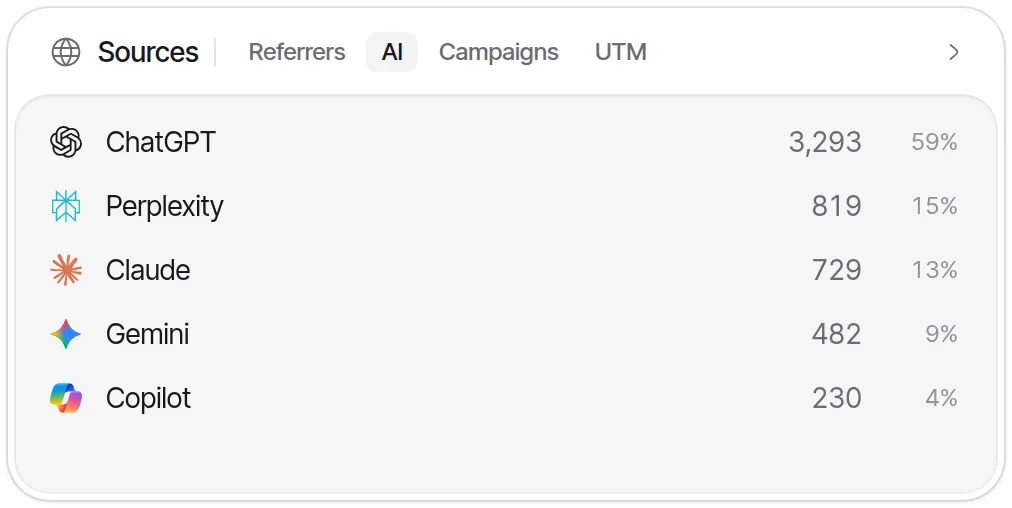
In invisit the referrer decides first. When a visit has no referrer and no ?ref=, an assistant named in utm_source sets its source, ahead of ad click IDs, so a ChatGPT app click tagged utm_source=chatgpt.com still counts as ChatGPT. The tags are kept either way and show in the UTM tab.
- Add the script to your site (installation). The core
invisit.jsis about 8.5 KB gzipped. - Open the Sources card and switch to the AI tab.
- Read the row per assistant; nothing needs configuring.
The free plan covers 20,000 events a month on up to 4 sites, with no card. One limit to know: invisit cannot import history from GA4 or any other tool, so its AI tab starts on the day you install it.
How to find AI traffic in Fathom, Matomo and tools without a channel
Fathom and Matomo have AI reports of their own; Mixpanel, Simple Analytics and Vercel Web Analytics need a filter on the referrer or the tag.
- Fathom: open the Referrers box and pick the AI tab, or filter on AI Source in Advanced Filters. A link tagged only with an assistant’s
utm_sourcecounts as AI; one that also hasutm_mediumorutm_campaignstays in Paid/Campaign (traffic sources). - Matomo: open Acquisition > AI Assistants, or build a segment with the condition
Channel Type Is ai(AI Assistants in Matomo). Matomo readsutm_sourceas a campaign name (campaign parameters), so look forchatgpt.comunder Acquisition > Campaigns as well. - Mixpanel: break down your page view event by
utm_sourceand by Initial Referring Domain, and filter both to the assistants’ domains. - Simple Analytics and Vercel Web Analytics: filter the referrer list to chatgpt.com, claude.ai, perplexity.ai, gemini.google.com and copilot.microsoft.com.
Which AI traffic can no analytics tool see?
Four kinds of AI-driven visit reach no AI channel in any tool, so treat every AI number as a floor.
- Clicks with neither clue. An app that sends no referrer, on a link with no tag, produces a visit that looks exactly like someone typing your address. It counts as direct.
- Remembered and retyped addresses. Someone who reads your name in an answer and types it later leaves no trace of the assistant.
- Google AI Overviews and AI Mode. Their clicks come from
google.com, so analytics tools count them as Google search, and GA4 writes them into Organic Search by definition. Search Console includes them in the Web search type of its Performance report, mixed with ordinary results (AI features and your website). - Answers with no click. When the answer is enough, nobody visits, and nothing reaches your analytics.
The last kind still leaves a trace on your server, if the assistant fetched your page to write the answer.
What about AI crawlers reading your pages?
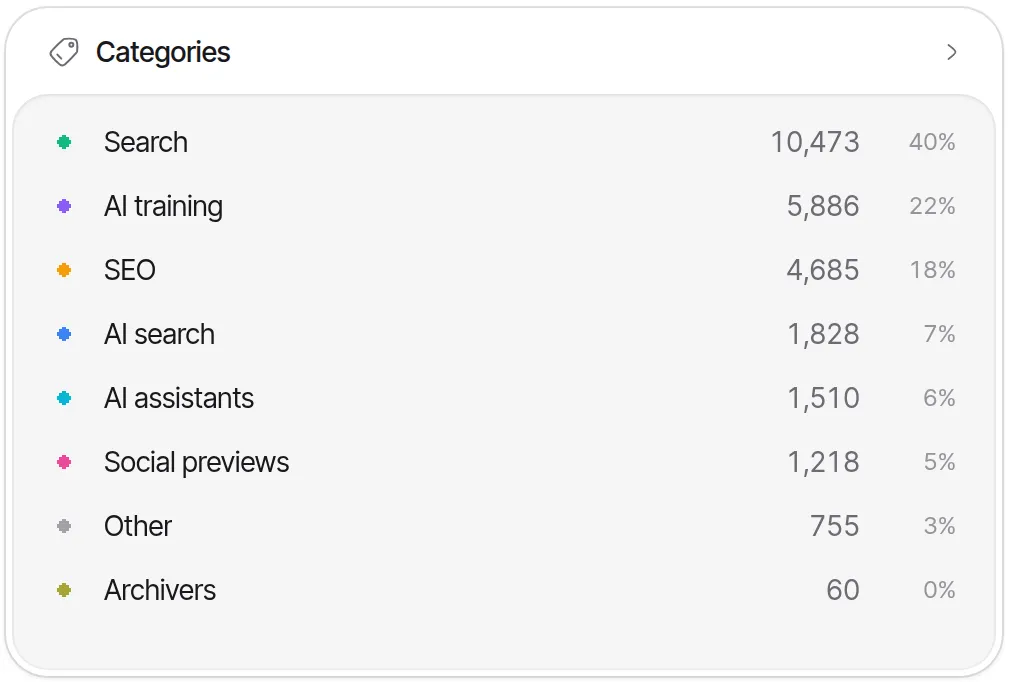
AI crawlers are the other half of AI traffic, and browser trackers rarely see them, because most crawlers do not run your JavaScript. User-triggered fetchers such as ChatGPT-User, Claude-User and Perplexity-User read a page because someone asked about it, which makes them the closest record you have of answers nobody clicked.
They have to be recorded where the request arrives. invisit does it server-side with @invisitdev/server and never bills crawler reads. Vercel’s AI Traffic tab does it at Vercel’s edge, and DataFast and Matomo offer server integrations of their own. Our post on AI crawlers covers that half in full.
Before you report an AI traffic number
- Search your source list for
chatgpt,openai,perplexity,claude,geminiandcopilot, and note every row outside the AI channel. - Confirm whether your tool reads
utm_source. If it does not, add the tagged rows by hand or with a custom channel. - Check that your redirects keep the query string. A redirect that drops it removes
utm_source=chatgpt.combefore your tracker runs. - Report Google AI Overviews and AI Mode as search, and say so next to the AI figure.
- Compare whole weeks under the same channel rules. When a tool adds assistants to its list mid-period, visits move between channels with no change in traffic.