The best Microsoft Clarity alternative depends on one thing: whether your team watches session recordings or mostly reads heatmaps and rage-click counts. If you watch recordings, PostHog is the closest free swap for a product team, with 5,000 recordings a month free, and Contentsquare, which Hotjar has merged into, is the pick for marketing and UX teams. If you mostly read heatmaps, a cookieless tool without a recorder covers that at a fraction of the privacy cost. Clarity itself is free with no traffic limits, so plenty of sites should keep it.
The best alternative by reason for leaving, as of November 2026:
If you watch recordings:
- Replays next to product analytics, feature flags and experiments, with an EU region: PostHog.
- Replays, heatmaps, surveys and AI summaries for marketing and UX research, the job Hotjar did: Contentsquare.
- The biggest free plan, with a year of history: FullStory Free, 30,000 sessions a month.
- Friction scores, form analytics and storage that can stay in the EU: Mouseflow.
- Debugging, with console logs, network requests and errors on every replay: LogRocket.
- Recordings that never leave your own servers: OpenReplay, self-hosted.
- Cookieless replays and heatmaps beside web analytics: Umami.
If you mostly read heatmaps and click frustration signals:
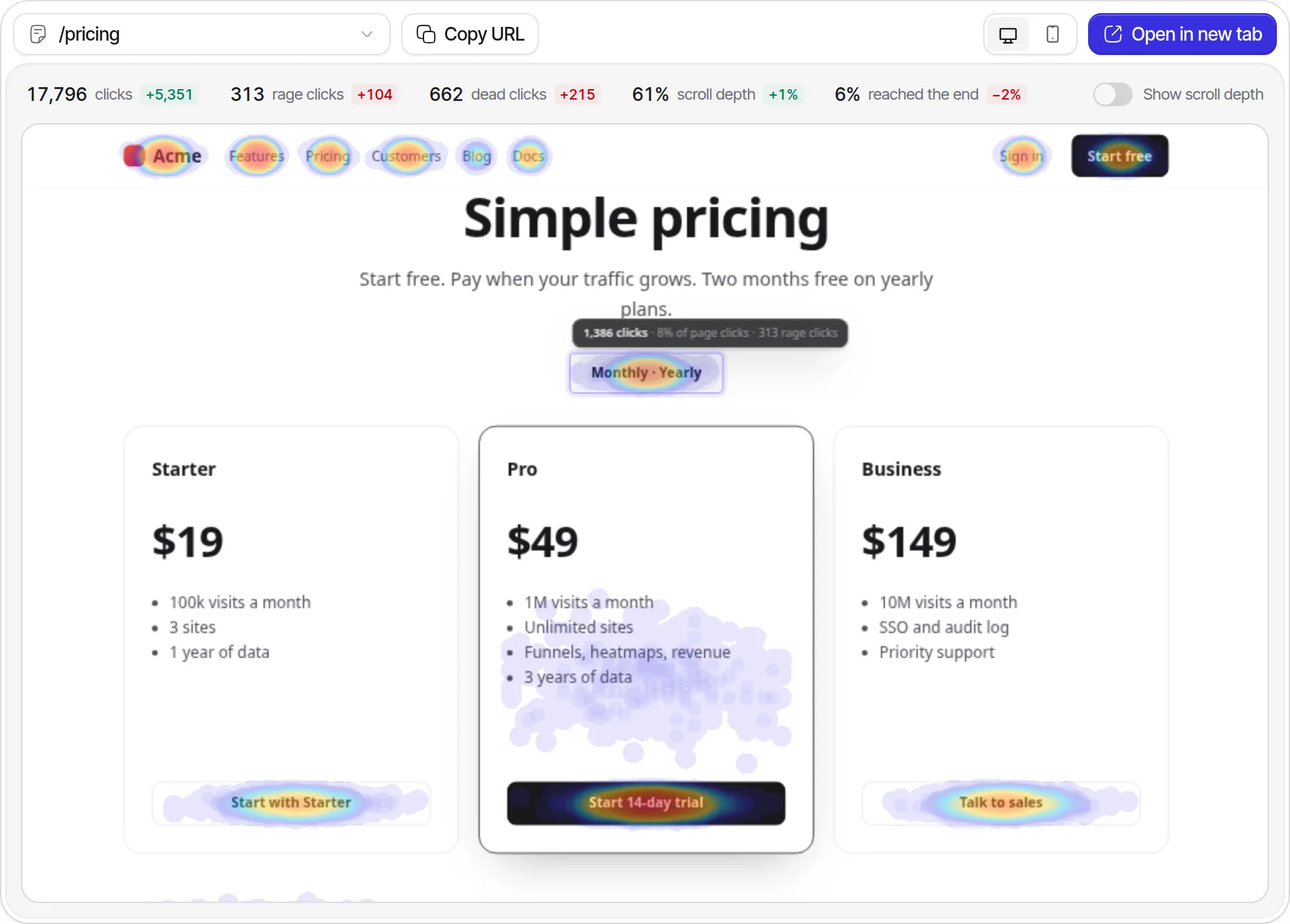
- Heatmaps that count clicks, rage clicks and dead clicks per element, with scroll depth, and no cookies or recordings: invisit, the tool we build.
We checked every price, limit and term below on the vendors’ own pages on November 3, 2026, and reused the script sizes from our script size test.
Why do people look for Microsoft Clarity alternatives?
People do not leave Microsoft Clarity over price, because Clarity is free with no traffic limits and no paid plan (FAQ). They leave over what Microsoft may do with the data, the consent rule Microsoft has enforced in Europe since October 31, 2025, recordings that expire after 30 days, and how little data comes back out.
The limits, from Microsoft’s docs and the Clarity terms of use (version 5), as of November 2026:
- Microsoft is a controller of your visitors’ data. Section 4.4(c) makes you and Microsoft “independent Controllers” and lets Microsoft use the personal data to “improve Microsoft’s products and services, including reporting and performance analysis; and create user profiles for purposes that include advertising.” Non-personal data may go to “training, fine-tuning, and evaluating machine learning models.” Your privacy notice must say that Microsoft collects personal data from you “to provide Microsoft Advertising” (section 4.4(b)).
- Consent in the EEA, the UK and Switzerland. Since October 31, 2025, Clarity enforces consent signals for visits from those regions, located by IP address (consent mode). Until your banner passes consent, through
consentv2or a supported consent platform, Clarity sets no cookies and “assigns a unique ID per page view” (Consent API), so a visit to page A and then page B becomes two sessions and full replays are unavailable. - Cookies, Microsoft’s included. With consent, Clarity sets
_clckfor 365 days and_clskfor 1 day (lifetimes read fromclarity.js0.8.75), plus third-party cookies such asMUID, which Microsoft lists as used “for advertising, site analytics, and other operational purposes” (cookie list). - Short recording history. Recordings are kept 30 days, favorited and labeled ones and a random sample up to 9 months, and heatmap and click data 9 months (data retention). You cannot download or delete a single recording, and deleting one visitor’s data means deleting the whole project.
- Little comes back out. The Data Export API returns dashboard aggregates for the last 1 to 3 days only: 10 requests per project per day, up to three dimensions, 1,000 rows, no pagination.
- Caps. Clarity keeps up to 100,000 recordings per project per day and samples above that, so at 200,000 sessions a day it keeps every other one (client API). One heatmap covers up to 100,000 page views (heatmaps).
- Restricted sites. Section 1(b) rules out content with “health care, financial services or government-related information”, and Clarity “shouldn’t be used on any websites/apps targeting users under the age of 18”. Clarity ignores Do Not Track, though it supports Global Privacy Control.
Who should stay on Clarity: if most of your visitors are outside the EEA, the UK and Switzerland, or you already run a consent banner that passes consentv2, your site is not in health, finance or government or aimed at children, and 30 days of recordings is enough, stay. Nothing below records up to 100,000 sessions a day for nothing, and Clarity’s Copilot summaries of recordings and heatmaps are free too (Copilot). Its loader and recorder measured 26,669 bytes gzipped, the smallest session recorder in our script test.
Do you need session recordings or only heatmaps?
Session recordings and heatmaps answer different questions and carry different privacy costs. A recording rebuilds one person’s visit from the page content and every mouse movement, click and scroll; a heatmap adds up clicks and scroll depth across everyone who saw a page.
The UK regulator draws its line in the same place. In its guidance on the statistics exception, the ICO lists “average scroll depth or the total number of hits on sections of a page” as likely to fit the exception, which needs a notice and a way to object but no consent, and “logs or recordings of individual visitors to your website and the actions they took” as needing consent. It adds that your analytics provider “must be a processor, not a joint controller”; Clarity’s terms make Microsoft an independent controller. The EU has no analytics exemption yet (our cookie banner guide).
So check what your team uses before you shop. Clarity dims a recording’s card once it has been viewed (FAQ), so scrolling back through last month’s Recordings list shows whether anyone watches them, or only opens the heatmap tab and the rage-click and dead-click counts on the dashboard.
What to look for in a Microsoft Clarity alternative
Judge a Clarity alternative on the half of Clarity you use, who controls the data, and what it costs at your traffic. Eight points separate the tools below:
- Recordings, heatmaps or both. Price only the half you use.
- Who controls the data. Clarity makes Microsoft a controller. PostHog, Contentsquare, FullStory, Mouseflow, LogRocket, Umami and invisit offer a data processing agreement under which they process visitor data for you; self-hosted OpenReplay involves no third party at all.
- What the script stores on the device. Most recorders keep a visitor ID in a cookie or localStorage. A “cookieless” setting that moves that ID into localStorage changes nothing for consent, as Mouseflow’s own docs say.
- The unit and the capture rate. Some tools bill sessions and record only a share of them; others bill each recording.
- Retention. Clarity keeps recordings 30 days and heatmaps 9 months.
- Masking defaults. Clarity’s default Balanced mode masks inputs, drop-downs, numbers and email addresses (masking). Some alternatives mask less by default.
- Where the data lives, and whether you can run the tool yourself.
- Getting data out: exports and APIs, where Clarity is weakest.
Microsoft Clarity alternatives compared
The first seven alternatives record sessions; invisit only has heatmaps and click signals. Clarity is the reference row.
| Tool | Recordings | Rage and dead clicks | Free plan | Recordings kept | Stored on the device by default | Data lives in |
|---|---|---|---|---|---|---|
| Microsoft Clarity | Up to 100,000 a day | Both | Everything, no traffic limit | 30 days | _clck 1 year, _clsk, Microsoft cookies |
Microsoft Azure |
| PostHog | Each one billed | Both | 5,000 recordings a month | 1 month free, 3 months paid | Cookie, 365 days | US or EU (Frankfurt), or self-hosted |
| Contentsquare (Hotjar) | All up to 20,000 sessions, then 15% | Frustration score from Growth | 200,000 sessions, 5% recorded | 1 month free, 2 months on Growth | _cs_id, 13 months |
Contentsquare cloud |
| FullStory | Each session | Both | 30,000 sessions a month | 12 months on Free | fs_uid, 1 year |
Google Cloud in the US and EU |
| Mouseflow | Each session | Both | 500 sessions a month | 1 to 12 months by plan | mf_user 90 days, session cookie |
Amsterdam or Virginia |
| LogRocket | Each session | Both | 1,000 sessions a month | 30 days on Free | _lr_tabs_ and _lr_hb_ cookies |
LogRocket cloud, or self-hosted |
| OpenReplay | Each session | Both | Self-hosted, or 1,000 on cloud | Your choice self-hosted, 30 days on Serverless | Session ID in sessionStorage | Your servers, or OpenReplay cloud |
| Umami | 15% of sessions by default | Dead clicks | Self-hosted; none on Cloud Hobby | 30 days | Nothing | EU or US cloud, or self-hosted |
| invisit | None | Both, per element | 20,000 events, 4 sites | No recordings | Nothing | Falkenstein, Germany |
Sources are linked in each tool’s section below. “Each session” means the tool can record every session on its paid plans.
How much do session recordings cost at 10,000 and 50,000 sessions a month?
Recording every session costs nothing on Clarity up to 100,000 a day. At 10,000 sessions a month, FullStory Free is also free and PostHog costs $25; at 50,000, PostHog is the cheapest paid recorder at $172.50, and Contentsquare’s Growth plan records only 20,000 of them for $279.
| Tool and plan | 10,000 sessions | 50,000 sessions | How it is billed |
|---|---|---|---|
| Microsoft Clarity | Free | Free | No billing |
| PostHog | $25 | $172.50 | 5,000 recordings free, then $0.005 each to 15,000 and $0.0035 to 50,000 |
| Contentsquare Growth | $69 | $279, records 20,000 | Sessions; all recorded up to 20,000, then 15% with a 20,000 minimum |
| FullStory | Free | Quoted | Free plan to 30,000 sessions; paid plans by quote |
| Mouseflow | $149 (Advanced) | $399 (Premium) | Session packs of 25,000 and 100,000; $109 and $319 a month billed yearly |
| LogRocket Core | $83 | $333 | Sessions; prices shown are per month on a yearly plan ($990 and $3,990 a year) |
| OpenReplay Serverless | $59.50 | $297.50 | $5.95 per 1,000 sessions; self-hosting costs only your server |
| Umami Business | $225 | $425 | $200 with 5,000 replays, then $0.005 each; $200 and $212.50 at the default 15% sample |
| invisit | $14 (no recordings) | $24 (no recordings) | Billed events; about three per visit makes 30,000 and 150,000 |
Prices are monthly billing unless noted, checked November 3, 2026. Contentsquare’s Growth plan has fixed session steps, so 50,000 sessions need the 60,000 step; yearly billing takes 20% off. LogRocket’s calculator shows yearly-plan prices only, and its FAQ says monthly billing is the default, without a public price. Mouseflow’s Advanced pack is the smallest that holds 10,000 sessions.
How do Clarity and its alternatives define rage clicks and dead clicks?
Only PostHog and invisit give exact thresholds for a rage click (invisit’s are in its heatmaps guide), and they use the same ones: three clicks within 30 pixels inside one second. The rest describe it in words, so one burst of clicks can count as rage in one tool and not in another.
| Tool | Rage click | Dead click |
|---|---|---|
| Microsoft Clarity | Multiple clicks “in a clustered area in rapid succession” | No visual change and no navigation “in a reasonable amount of time” |
| PostHog | Three clicks, each within 30 pixels and 1 second of the last | A click that does not change the page |
| FullStory | Clicking “multiple times, rapidly, in the same area” | Nothing on the page changes “within a few seconds” |
| LogRocket | “Rapid, repeated clicks on the same element” | No DOM, style, navigation, input or dialog change after a click on something that looks interactive |
| Mouseflow | Repeated clicks on an element “within a short period” | A click on something that looks interactive but is not; real buttons and links are excluded |
| invisit | 3 or more clicks within 30 pixels inside one second | A click on a button, link or pointer-cursor element with no visible reaction within one second; plain link navigations and form submits never count |
Sources: Clarity, PostHog, FullStory, LogRocket, Mouseflow.
The dead-click split matters most. A broken checkout button is a dead click in LogRocket and invisit, which only judge elements that look clickable, and not in Mouseflow, which only judges elements that are not real buttons or links. Expect your frustration counts to change when you switch, even if nothing on the site did.
Microsoft Clarity vs Hotjar in 2026
Hotjar is no longer a separate product you can sign up for: new users land on Contentsquare, and existing Hotjar accounts move to Contentsquare’s Growth plan unless the owner opts out (Contentsquare). Comparing Clarity with Hotjar now means comparing Clarity with Contentsquare.
| Microsoft Clarity | Contentsquare (formerly Hotjar) | |
|---|---|---|
| Price | Free | Free, or Growth from $49 a month for 7,000 sessions |
| Sessions included | No traffic limit | 200,000 a month on Free |
| Recordings | Up to 100,000 a day | 5% of sessions, at most 10,000, on Free; all up to 20,000 on Growth |
| Recordings kept | 30 days | 1 month on Free, 2 months on Growth |
| Heatmap data kept | 9 months | 1 month on Free, 13 months on Growth |
| AI summaries | Copilot, free | Replay and heatmap summaries on Growth |
| Main cookie | _clck, 1 year |
_cs_id, 13 months |
| Role under GDPR | Microsoft is an independent controller | Processor, and a controller for benchmarking and internal development |
Clarity wins on price and volume. Contentsquare adds surveys (100 responses a month free), longer history on Growth and a processor contract. Both need consent for EU visitors.
1. PostHog: best for product teams that want replays next to analytics and flags
PostHog records sessions alongside product analytics, heatmaps, feature flags, experiments, surveys and error tracking, all on one event stream, so a funnel drop-off opens the replays behind it. For a team that used Clarity on a signed-in product, it is the closest free swap.
PostHog bills each recording. As of November 2026, PostHog’s replay pricing includes 5,000 web recordings a month free, then $0.005 each up to 15,000, $0.0035 up to 50,000 and $0.002 up to 150,000. Recordings are kept 1 month on the free plan and 3 months on pay-as-you-go. Heatmap data is free to ingest, but the free plan collects it for 3 pages you choose (heatmaps).
What PostHog does better than Clarity: it acts as your processor under a DPA, stores data in Frankfurt if you pick PostHog Cloud EU, and lets you query events with SQL and send them to your warehouse with batch exports. Its rage-click thresholds are published and configurable, and an MIT-licensed hobby edition runs on your own server.
What PostHog does worse: the main script plus its replay recorder measured about 187 KB gzipped, seven times Clarity’s 26.7 KB. posthog-js sets a 365-day cookie by default, and its cookieless mode keeps replay off for visitors without consent (persistence). Inputs are masked by default but page text is not (privacy controls), which is looser than Clarity’s Balanced mode, so set maskTextSelector before launch.
Moving from Clarity: clarity("event", "signup") becomes posthog.capture('signup'), clarity("identify", id) becomes posthog.identify(id), and data-clarity-mask becomes the ph-no-capture class. See PostHog vs invisit.
2. Contentsquare (formerly Hotjar): best for marketing and UX teams that want replays, surveys and AI summaries
Contentsquare is where Hotjar went. It records replays, builds heatmaps and funnels, runs surveys, and on Growth summarizes replays and heatmaps with AI. Contentsquare acquired Hotjar in 2021, closed Hotjar signups, and has been moving existing Hotjar accounts to its Growth plan in phases since August 26, 2026 (migration FAQ).
Contentsquare bills sessions. As of November 2026, Contentsquare’s pricing has a Free plan with 200,000 sessions a month, replays for 5% of them up to 10,000, one project and one month of data. Growth runs from $49 a month for 7,000 sessions to $739 for 200,000 on monthly billing, records every session up to 20,000 and 15% beyond that with a minimum of 20,000, and keeps analytics 13 months and replays 2 months. Once a Growth month’s sessions run out, no more session data is collected until the next month.
What Contentsquare does better than Clarity: surveys and feedback widgets (100 responses a month free), journey analysis and impact estimates on Growth, a year of history to compare against, and a DPA that makes it your processor.
What Contentsquare does worse: paid plans record a sample, so a 50,000-session month on Growth records 20,000 visits for $279. APIs start on Pro, which is quoted. The tag sets _cs_id for 13 months, and its cookieless setting moves the same IDs into localStorage (cookies). The DPA also lets Contentsquare process customer data as a controller for benchmarking and internal development. Hotjar heatmaps and recordings do not move across: they stay read-only in Hotjar for 12 months, then are deleted.
Moving from Clarity: replace the Clarity tag with Contentsquare’s, recreate masking rules, and add Contentsquare’s cookies to your consent tool. No tool imports Clarity recordings.
3. FullStory: best free plan for recordings, with a year of history
FullStory records sessions and builds heatmaps, scroll maps and click maps, and flags rage clicks, dead clicks, error clicks and thrashed cursors. Its free plan is the most generous of the alternatives, for sites under 30,000 sessions a month.
As of November 2026, FullstoryFree includes 30,000 sessions a month, 12 months of data and up to 10 users, with no card. The Business, Advanced and Enterprise plans add dashboards and FullStory’s StoryAI agents, at prices FullStory quotes on request.
What FullStory does better than Clarity: 12 months of recordings on the free plan against 30 days, and a Private by Default setting under which no text leaves the browser unless you allowlist it (Private by Default). Its DPA applies automatically to customers with EU or UK visitors, and its data is processed in Google Cloud in the US and the EU (GDPR FAQ).
What FullStory does worse: past 30,000 sessions there is no public price. The fs_uid cookie lasts a year (cookies), and Private by Default is switched on through a request to FullStory’s support team.
Moving from Clarity: clarity("event", "signup") becomes FS('trackEvent', { name: 'signup', properties: {} }) (events), and data-clarity-mask becomes the fs-mask or fs-exclude class.
4. Mouseflow: best for friction scores, form analytics and EU data storage
Mouseflow records sessions and builds click, scroll, attention, movement and geo heatmaps, with funnels, form analytics and a friction score per page and session. Data is stored in Amsterdam or Virginia depending on where you sign up and never moves between them, and Mouseflow does not store IP addresses (data storage).
Mouseflow bills sessions. As of November 2026, Mouseflow’s pricing on monthly billing is Free for 500 sessions with 1 month of data, Essential at $39 for 5,000 (3 months), Advanced at $149 for 25,000 (6 months) and Premium at $399 for 100,000 (12 months), or $25, $109 and $319 a month billed yearly. When a month’s sessions run out, tracking stops until the refill.
What Mouseflow does better than Clarity: seven friction events with a points system (a click-rage counts 5 points per element, a dead click 1) that ranks pages and sessions by how much they frustrate visitors (friction score), form analytics, an EU data center for EU sign-ups, and a DPA that makes it your processor.
What Mouseflow does worse: the price climbs quickly, so 50,000 sessions need the $399 Premium pack, and a year of data is Premium-only. It sets a session cookie and mf_user for 90 days; its Disable Cookies option moves them to localStorage, which Mouseflow notes “does not remove consent or privacy obligations.” Its dead clicks skip real buttons and links.
Moving from Clarity: clarity("set", "plan", "pro") becomes _mfq.push(["setVariable", "plan", "pro"]) and clarity("event", "signup") becomes _mfq.push(["tag", "signup"]) (JavaScript API).
5. LogRocket: best for engineers who debug from replays
LogRocket attaches console logs, network requests and JavaScript errors to each replay, and groups rage clicks, dead clicks and slow network requests into signals you can triage (signals). Its Core plan includes product analytics, heatmaps, rage-click maps, funnels and path analysis (pricing).
LogRocket bills sessions. As of November 2026, the free plan covers 1,000 sessions a month and keeps them 30 days (security exhibit). Core, for fewer than 100,000 sessions, costs $83 a month at 10,000 sessions, $176 at 25,000 and $333 at 50,000 on a yearly plan; Pro, with AI summaries, is the plan from 100,000 sessions, at $717 a month. Seats, longer retention and add-ons raise the final price.
What LogRocket does better than Clarity: the technical context behind each replay, a detailed published dead-click definition, a processor role under its DPA, and a self-hosted deployment on Enterprise.
What LogRocket does worse: no public monthly-billing price, and masking is mostly opt-in. Password fields are never recorded; for other inputs and text, LogRocket’s privacy docs have you add data-private or turn on the SDK’s sanitizers (privacy). The SDK sets the first-party cookies _lr_tabs_ and _lr_hb_ (cookies).
Moving from Clarity: clarity("event", "signup") becomes LogRocket.track('signup'), clarity("identify", id) becomes LogRocket.identify(id), and data-clarity-mask becomes data-private.
6. OpenReplay: best for keeping recordings on your own servers
OpenReplay is open-source session replay you host yourself, with developer tools, product analytics, heatmaps and co-browsing, so recordings never reach a third party (GitHub). It flags rage clicks, dead clicks, errors, failed requests and high CPU or memory use automatically (issue types).
Self-hosting is free. Most of the code is AGPL v3, some directories are MIT, and the ee/ directory has its own license (LICENSE). The Docker Compose install, which OpenReplay marks experimental, needs at least 2 vCPUs, 8 GB of RAM and 50 GB of storage (deployment). As of November 2026, OpenReplay’s cloud is free for 1,000 sessions a month with 7 days of data, Serverless costs $5.95 per 1,000 sessions with 30 days, and a dedicated instance starts at $199 a month.
What OpenReplay does better than Clarity: no vendor ever sees your visitors’ data, you set the retention, tracking is first-party, and by default emails in page text are obscured and input values are not recorded in plain text (sanitizing data).
What OpenReplay does worse: you run it. OpenReplay’s own pricing page rates the open-source edition for low traffic, and backups, upgrades and disk growth are yours. Self-hosting removes the vendor, not the consent question: recordings of individual visitors still need consent in the UK, by the ICO’s reading.
Moving from Clarity: clarity("event", "signup") becomes tracker.event('signup') (event method), clarity("identify", id) becomes tracker.setUserID(id), and data-clarity-mask becomes data-openreplay-obscured.
7. Umami: best for cookieless replays and heatmaps beside web analytics
Umami is MIT-licensed web analytics that added session replays in version 3.1 and heatmaps in 3.2, with no cookies, on Umami Cloud or your own server. It suits a team that wants traffic reports and a sample of recordings in one cookieless tool.
As of November 2026, Umami’s pricing puts replays and heatmaps on Business, $200 a month with 10 million events and 5,000 replays, then $0.005 a replay; self-hosted Umami includes both. Umami records 15% of sessions by default, stops each recording at 5 minutes, masks inputs, and keeps replays 30 days (replays). Heatmaps show clicks, dead clicks and scroll depth by screen width, also from a 15% sample by default (heatmaps).
What Umami does better than Clarity: no cookies or device ID, a DPA, an EU or US cloud region, self-hosting, and traffic analytics with funnels and retention in the same tool.
What Umami does worse: the recorder script measured 58.4 KB gzipped and every visitor downloads it, even though most are not recorded (our script test). Umami’s heatmap docs mention dead clicks but not rage clicks, the page preview needs your site to allow framing through frame-ancestors, and on Cloud replays need the $200 plan. Cookieless does not settle consent for recordings.
Moving from Clarity: add Umami’s recorder.js tag beside the tracker and turn on Replays and Heatmaps in the site settings. clarity("event", "signup") becomes umami.track('signup'). See Umami vs invisit.
8. invisit: best for heatmaps and click frustration signals without recordings
invisit, the tool we build, is cookieless web analytics with heatmaps on your real, live pages: clicks per element, rage clicks, dead clicks, and scroll depth in 5% bands. It does not record sessions. If your team watches Clarity recordings, invisit does not replace Clarity; it fits teams that open Clarity for the heatmap tab and the frustration counts.
invisit bills page views, custom events, conversions and short-link clicks; heatmap clicks, scroll depth and web vitals are never billed (billing). The Free plan covers 20,000 events a month on 4 sites without a card, and paid plans cost $14 for 100,000 events, $24 for 250,000, $49 for 1M and $199 for 10M (pricing). Data is kept forever.
What invisit does better than Clarity: no cookies, nothing stored on the device, and no visitor followed across days, because the daily salt behind its visitor hash is deleted about 25 hours after each day ends. Raw IP addresses are never stored, data stays in Falkenstein, Germany, under a DPA, and Global Privacy Control and Do Not Track can be honored when you turn them on. Rage and dead clicks have exact thresholds, listed above, heatmap data never expires, and the REST API and MCP server read every report. invisit’s core script plus its web vitals and heatmap modules measured 11.1 KB gzipped, against Clarity’s 26.7 KB.
invisit also shows each visit as a list of its pages and events, live in Realtime and at any age through the API:
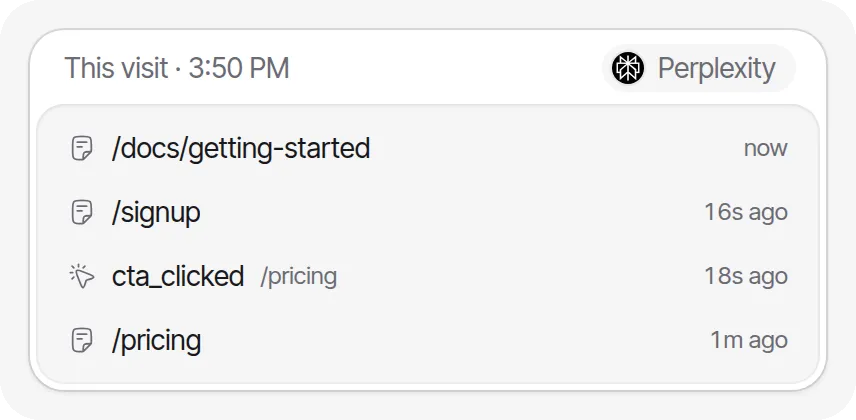
What invisit does worse: no recordings, so you see which element drew rage clicks but not the mouse path that led there. There are no mouse-movement or attention maps, no JavaScript error tracking, no surveys and no mobile app SDKs, all of which Clarity or other tools here have. There is no self-hosting, and Cloudflare, a US company, runs DNS and CDN in front. The visit log records what individual visits did, close to the “logs … of individual visitors” the ICO keeps outside its UK exception, so requireConsent is the conservative setting there (requiring consent).
Moving from Clarity: turn heatmaps on for the site in the dashboard, with no code change (heatmaps guide). clarity("event", "signup") becomes track('signup') and clarity("identify", id) becomes identify(user.id), which stores only a hash of your id (events guide). Nothing needs masking, because invisit never captures page content.
When to stay on Clarity, and how to switch
Stay on Clarity if the conditions in the first section hold: consent is handled or not needed, your site is not in a restricted sector, and 30 days of recordings answers your questions. Switching pays only when Microsoft’s data use, the consent gaps or the short history cost you something real.
If you switch, keep Clarity running until the new tool has proved itself:
- Decide what you need. If nobody plays recordings, pick a heatmap tool and skip the recorder’s consent and cost.
- Save what Clarity will delete. Recordings cannot be downloaded, so favorite or label the ones you must keep, which holds them up to 9 months, and download the heatmaps you want to keep.
- Add the new tool to your consent banner and privacy notice, then run both for two to four weeks. Compare page views, not sessions: Clarity counts every page view as a session for visitors from the EEA, the UK and Switzerland who have not consented.
- Move your events and masking rules, using the table below.
- Remove the Clarity tag. Delete the Clarity project only once you no longer need its data, because a deleted project cannot be restored.
| Clarity call | PostHog | Mouseflow | LogRocket | OpenReplay | invisit |
|---|---|---|---|---|---|
clarity("event", "signup") |
posthog.capture('signup') |
_mfq.push(["tag", "signup"]) |
LogRocket.track('signup') |
tracker.event('signup') |
track('signup') |
clarity("identify", id) |
posthog.identify(id) |
_mfq.push(["identify", id]) |
LogRocket.identify(id) |
tracker.setUserID(id) |
identify(user.id) |
data-clarity-mask="true" |
class="ph-no-capture" |
Visual Privacy Tool | data-private |
data-openreplay-obscured |
Not needed |
Mouseflow’s identify is available on select plans only (JavaScript API), and invisit’s identify() stores only a hash of your id.
Checklist before you switch
- Check whether anyone on your team played a Clarity recording last month.
- Favorite or label the recordings you need to keep, before their 30 days run out.
- Price the new tool at your real session count, in its own unit and capture rate.
- Test the new tool’s masking on a page with a form and an email address before it goes live.
- Add the new tool to your consent banner and privacy notice, and drop the Microsoft Advertising disclosure once Clarity is gone.
- Run both tools side by side for two to four weeks before you remove Clarity.
The trap to avoid is assuming that a cookieless or EU-hosted recorder lets the banner go. The ICO puts recordings of individual visitors outside its consent exception wherever the data is stored, and the EU has no analytics exemption at all yet. If dropping the banner is the goal, the recordings go first; check what remains against our cookie banner guide.