
Documentation analytics measures whether your docs answer people, not only how many open them: what readers search for and fail to find, which pages search engines and AI assistants send them to, whether a page helped, which code they copy, and whether the docs lead to a signup or the dashboard. It also counts the AI crawlers and assistants that read your docs without running JavaScript, which page-view analytics never sees.
As of November 2026, Mintlify, GitBook and ReadMe report searches, page ratings and AI agent reads on their own. Docusaurus, Starlight, VitePress and Nextra report nothing, so you add a tracker and a few events. Below is a table of what each platform gives you, then search, rating and copy-code events we tested on a Starlight 0.42.8 site with invisit, the cookieless analytics tool we build, and how to see which pages AI assistants read.
Why do page views mislead on documentation?
A page view counts the reader who found the answer in ten seconds and the reader who gave up and opened a support ticket the same way. Docs traffic also rises for bad reasons: a confusing API or a breaking release sends people to the troubleshooting page, which then tops your report.
Three distortions are specific to docs:
- Search hides failure. A reader who searches, finds nothing and leaves records one page view on the page they started from.
- Agents read without a browser. A coding assistant that fetches
/llms.txtor a page’s Markdown copy runs no JavaScript, so a script-based tool records nothing. GitBook counts these readers in a separate report and Mintlify in a separate agent view, so their human numbers stay clean. - Measurement changes move the line. Mintlify says agent views rose on most sites around June 8, 2026, because it began recognising more agent user agents, which reflects “improved measurement and agent access, not a sudden change in traffic” (Mintlify traffic docs).
What to measure on a documentation site
Seven signals tell you more about docs than page views do. Each comes from a different place, and the last one never comes from the browser:
| Signal | What it tells you | Where it comes from |
|---|---|---|
| Searches, and searches with no results | The words readers use, and the topics you never covered | Your search tool, or a custom event |
| Entry pages from search engines | Which pages rank | Referrer plus entry page; the queries themselves only in Search Console |
| Entry pages from AI assistants | Which pages ChatGPT, Claude or Perplexity send people to | AI referrers and utm_source |
| “Was this page helpful?” | Which pages fail readers | A rating widget |
| Copy-code clicks | Which examples people actually run | A click on the copy button |
| Docs to signup or dashboard | Whether the docs bring users | A click event, or a funnel |
| AI crawler and assistant reads | Which pages, llms.txt files and Markdown copies agents fetch |
Server or edge logs |
GitBook’s own guide calls search terms possibly “the most valuable quick-win metric available” (GitBook). A search with no results is a reader naming, in their words, what is missing or misnamed.
Which docs platforms have built-in analytics?
Mintlify, GitBook and ReadMe do, each with search reports and page feedback. Material for MkDocs integrates Google Analytics 4 and a feedback widget. Docusaurus, Starlight, VitePress and Nextra have none and run whatever script you add. As of November 2026, from each vendor’s docs:
| Platform | Built-in analytics | Your own script | Search analytics | Page feedback |
|---|---|---|---|---|
| Mintlify | Pro ($450 a month billed yearly) and Enterprise: traffic, human and agent views, search, feedback | Any .js file in the content folder, every plan; 16 integrations, GA4, Plausible and PostHog among them |
Volume, frequent queries, queries with no results, click-through | Thumbs, comments, code snippet feedback, agent feedback |
| GitBook | Essential ($65 per site a month billed yearly) and up: Traffic, Agents & MCP, AI Assistant | No custom JavaScript; integrations only, such as GA, Plausible, Fathom, PostHog | What readers typed; searches with no results among its gaps | Sad, neutral or happy face, with comments |
| ReadMe | Metrics on every plan, Starter ($0) included: page views split into agent and human, search terms, page quality | Custom JavaScript on Enterprise only; GA and Segment integrations | Top search terms and volume | “Did this page help you?” thumbs, with a comment |
| Docusaurus 3.10 | None | scripts config or a client module; official gtag and Tag Manager plugins |
With Algolia DocSearch, in Algolia’s dashboard | None |
| Starlight 0.42 | None | head config |
None: Pagefind searches in the browser | None |
| VitePress 1.6 | None | head config |
None for local search (MiniSearch); Algolia as with Docusaurus | None |
| Nextra 4.6 | None | Anything: it is a Next.js app | None: Pagefind | A “Question? Give us feedback” link that opens a GitHub issue |
| Material for MkDocs 9.8 | GA4 integration | A custom analytics partial | Through GA4’s site search measurement | Built-in “Was this page helpful?” widget, sent to GA4 or your code |
Sources: Mintlify (analytics, search, feedback, integrations, custom scripts, pricing), GitBook (traffic, plans, docs analytics, integrations), ReadMe (metrics, custom code, plans, integrations), Docusaurus plugins and search, Starlight, VitePress search, Nextra (search, layout), Material for MkDocs.
Three limits matter when you choose. GitBook runs no third-party script outside its integration list, invisit included: building an integration that injects JavaScript “is not possible at this time” (GitBook). GitBook’s own analytics sets cookies to recognise returning visitors, and turning them off turns its analytics off (site settings). Material for MkDocs is in maintenance mode, with critical fixes until May 5, 2027 (announcement).
On Docusaurus with DocSearch you need no search code. Algolia’s dashboard has a Searches without Results tab, counts as-you-type searches within 30 seconds as one, and tells users apart by IP address unless you set a user token (Algolia’s metrics). Its searches without clicks need click events, which Docusaurus sends only with insights: true, off by default.
How to send docs search queries as events without personal data
Send one event per finished search, with the cleaned-up query, the number of results and a found flag, and drop every query that looks like an email address, a phone number, a key or a file path. Starlight, Nextra and any other Pagefind site search in the browser, so nothing reaches a server unless you send it. This module listens to Pagefind’s default search box and counts results with the same Pagefind file the box loaded:
// One docs_search event per finished search: never the keystrokes on the way, and never a query
// that looks like someone's data rather than a docs topic.
const PAGEFIND = '/pagefind/pagefind.js' // the same file the search box loads; add your base path
const MEASURE_MS = 500 // wait this long after the last keystroke, then count the results
const SETTLE_MS = 1000 // and this much longer before sending, unless the reader leaves first

const EMAIL = /[^\s@]+@[^\s@]+\.[^\s@]+/
const LONG_NUMBER = /\d{9,}/ // phone, card and order numbers, once spaces and dashes are gone
const KEY_LIKE = /(?=[\w-]*\d)(?=[\w-]*[a-z])[\w-]{24,}/i // API keys, tokens, UUIDs
const HOME_PATH = /\/users\/|\/home\/|[a-z]:\\users\\/i // pasted stack traces name the user

function clean(raw) {
  const query = raw.normalize('NFKC').trim().replace(/\s+/g, ' ').toLowerCase().slice(0, 80)
  if (query.length < 2) return null
  const digits = query.replace(/[\s().+-]/g, '')
  if (
    EMAIL.test(query) ||
    LONG_NUMBER.test(digits) ||
    KEY_LIKE.test(query) ||
    HOME_PATH.test(query)
  ) {
    return null
  }
  return query
}

let latest = null
let measureTimer
let sendTimer

function send() {
  clearTimeout(sendTimer)
  if (!latest) return
  window.invisit?.track('docs_search', latest)
  latest = null
}

document.addEventListener('input', (event) => {
  const input = event.target
  if (!(input instanceof HTMLInputElement) || !input.matches('.pagefind-ui__search-input')) return
  clearTimeout(measureTimer)
  clearTimeout(sendTimer)
  latest = null
  const query = clean(input.value)
  if (!query) return
  measureTimer = setTimeout(async () => {
    const pagefind = await import(PAGEFIND)
    const { results } = await pagefind.search(query)
    if (clean(input.value) !== query) return // the reader kept typing
    latest = { query, results: results.length, found: results.length > 0 }
    sendTimer = setTimeout(send, SETTLE_MS)
  }, MEASURE_MS)
})

// A reader who clicks a result leaves before the timer fires: send what they searched on the way out.
addEventListener('pagehide', () => {
  send()
  window.invisit?.flush()
})
In Starlight, load it next to the tracker through the head option. Files in public/ are served as they are, and the Astro analytics guide covers the rest of the Starlight setup:
import { defineConfig } from 'astro/config'
import starlight from '@astrojs/starlight'

export default defineConfig({
  integrations: [
    starlight({
      title: 'Docs',
      head: [
        {
          tag: 'script',
          attrs: {
            src: 'https://api.invisit.dev/invisit.js',
            'data-site': '<site id>',
            'data-collector': 'https://api.invisit.dev',
            async: true,
          },
        },
        { tag: 'script', attrs: { type: 'module', src: '/docs-search.js' } },
      ],
    }),
  ],
})
Three choices in it are deliberate:
- The query is lowercased and its spaces collapsed, so “Webhook signature” and “webhook signature” land in one row.
foundis a boolean because analytics tools list booleans and strings as values you can click, while a number usually becomes an average.- The
pagehidebranch exists because Starlight is a multi-page site: clicking a result loads a new page and kills the timer.
On Nextra, Pagefind lives at /_pagefind/pagefind.js and the search box is Nextra’s own, so change PAGEFIND and the selector. For another tool, swap the track line for its call.
What we tested
On November 3, 2026 we served a static Starlight 0.42.8 build (Astro 7.4.5, Pagefind 1.6.0), drove it with Playwright in headless Chrome 155, sent events to our local invisit development stack with data-debug="true" so automation is not ignored, and read the stored events back from the database:
| Typed into the search box | Stored event |
|---|---|
Webhook signature |
query: "webhook signature", results: 1, found: true |
graphql subscriptions |
query: "graphql subscriptions", results: 0, found: false |
jane.doe@example.com |
Nothing |
sk_live_51H8xYzAbCdEfGhIjKlMnOp |
Nothing |
ENOENT /Users/jane/app/config.json |
Nothing |
+1 (415) 555-0134 |
Nothing |
@astrojs/starlight |
results: 3, found: true |
api key, then a result clicked within a second |
results: 2, found: true, sent on pagehide |
No partial query was ever sent. One trap if you test this way: a user agent set on Playwright’s browser context did not cover requests sent while a page unloads. Those left as HeadlessChrome, and the collector, correctly, dropped them as a headless browser. Passing --user-agent when launching the browser fixed it.
To list searches with no results in invisit, open Events, pick docs_search, and click No under found in the Properties card; the query list then holds only the searches that found nothing. We checked that filter through the same API the dashboard uses. Each docs_search is a billed custom event, one more reason to send one per finished search. As a second net, invisit replaces email addresses and long digit runs in property values with [redacted], and cuts strings at 256 characters.
How to add “Was this page helpful?” to Starlight, Docusaurus or VitePress
Put two buttons at the bottom of each page that each send one event with the answer and the page path. In Starlight, override the Footer component; with invisit, data-invisit-event attributes record the click without any tracking code:
---
import Default from '@astrojs/starlight/components/Footer.astro'

const page = Astro.url.pathname
---

<div class="page-rating">
  <span>Was this page helpful?</span>
  <button type="button" data-invisit-event="page_rated" data-invisit-prop-helpful="yes" data-invisit-prop-page={page}>Yes</button>
  <button type="button" data-invisit-event="page_rated" data-invisit-prop-helpful="no" data-invisit-prop-page={page}>No</button>
</div>
<Default><slot /></Default>

<script>
  // One answer per page view: thank the reader and take the buttons away.
  for (const button of document.querySelectorAll('.page-rating button')) {
    button.addEventListener('click', () => {
      button.parentElement!.textContent = 'Thanks for telling us.'
    })
  }
</script>
Register it with components: { Footer: './src/components/Footer.astro' } in the Starlight config. The page travels as a property because invisit breaks an event down by its properties, not by page: click no under helpful and the page list shows the pages that failed most often. In our test, three clicks on two pages stored three page_rated events with both properties.
The same buttons go into Docusaurus by wrapping the DocItem/Footer component with swizzle, and into VitePress through the default theme’s doc-after layout slot. Material for MkDocs already draws the widget; set provider: custom and call window.invisit?.track() from the submit handler in its custom feedback example.
invisit’s feedback widget answers the why
invisit’s on-page feedback widget is a free-text form, not a rating: a message of up to 2,000 characters and an optional email address for a reply. Each message is stored with its page, with sensitive query parameters stripped, the country, device type, browser and operating system, and a link to the visit when the tracker may follow the visitor.
Messages land in the site’s Feedbacks inbox, marked new or resolved and searchable, each with the visit that led to it, page by page. Turn it on under Settings → Collection and choose the button text, corner, question and accent colour, or hide the floating button and open it from your own link with invisit.feedback(). Feedback is never billed. The rating finds the pages; the widget tells you what is wrong with them.
How to track copy-code clicks in docs
Listen for clicks on the code blocks’ copy buttons and send the page and the code’s language. Each generator draws its own button, so one delegated listener covers three of them:
// One code_copied event per click on a code block's copy button, with the page and the language.
const BUTTONS = [
  '.expressive-code .copy button', // Starlight
  'button[aria-label="Copy code to clipboard"]', // Docusaurus, English UI
  'div[class*="language-"] > button.copy', // VitePress
].join(', ')

document.addEventListener('click', (event) => {
  const button = event.target instanceof Element ? event.target.closest(BUTTONS) : null
  if (!button) return
  const block = button.closest('.expressive-code, div[class*="language-"]')
  const lang =
    block?.querySelector('pre[data-language]')?.dataset.language ??
    block?.className.match(/language-([\w-]+)/)?.[1] ??
    'text'
  window.invisit?.track('code_copied', { page: location.pathname, lang })
})
We clicked both copy buttons on a Starlight page and got two events, lang: "sh" and lang: "ts". The Docusaurus and VitePress selectors come from the source of Docusaurus 3.10.2 and VitePress 1.6.4, and Docusaurus translates its button label on sites in other languages. A reader who selects code and presses Ctrl+C never touches the button, so treat the count as a floor. Mintlify records copies on its own as docs.code_block.copy.
Which docs pages do AI assistants read?
Two different things answer that question: people who click through from an AI answer, which a browser tracker sees, and agents that fetch your pages themselves, which only the server sees.
For clicks, invisit’s AI tab in the Sources card recognises 19 assistants by referrer and by utm_source. Click ChatGPT there and the dashboard filters to its referrer domains; the Entry tab of the Pages card then lists the docs pages those visitors landed on. A Google row does the same for search, though the queries themselves stay in Google Search Console, which invisit does not import. Our AI traffic guide compares how other tools file these clicks.
For reads, the hosted platforms report it for you. Mintlify groups agent views by provider, such as ChatGPT, Claude and Cursor, with a bucket for HTTP clients like cURL and Python. GitBook’s Agents & MCP report counts reads by surface: Markdown, llms.txt, MCP, page views and RSS (GitBook). ReadMe splits page views into agent and human.
On a docs site you run yourself, invisit records these reads with @invisitdev/server in your middleware. It keeps GET and HEAD document requests whose user agent looks like a crawler, and skips framework data requests and static assets by extension (CSS, JavaScript, images, fonts). So /llms.txt, /llms-full.txt, every .md copy, robots.txt and sitemaps show up by path. The Crawlers card groups them into AI training, AI search and AI assistants, the user-triggered fetchers such as ChatGPT-User and Claude-User. Click a bot to see the pages it read. Crawler reads are never billed.
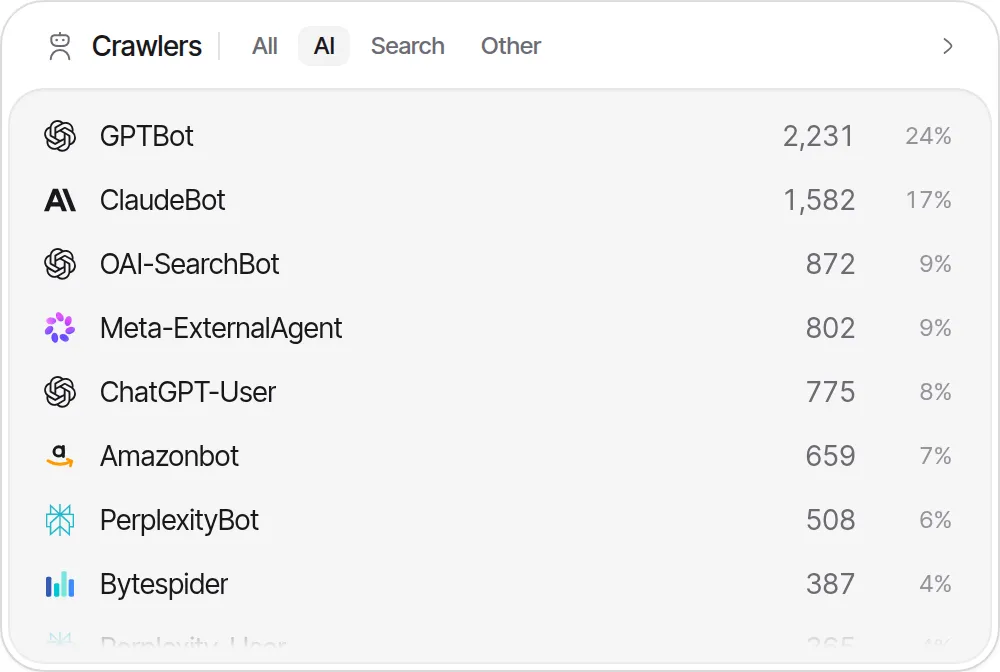
Mintlify counts something invisit does not. invisit records a user agent only when it names a known crawler or calls itself a bot, crawler, spider or fetcher, so a coding agent that fetches your docs as plain curl or python-requests goes uncounted. Our AI crawler list names every documented AI user agent and shows how to count them in an nginx log.
What does a static docs host mean for crawler reads?
On a static host such as GitHub Pages, S3 or a plain file server, no code of yours runs per request, so a browser script sees only humans. Read the host’s access logs, or put an edge function in front. invisit’s Cloudflare Workers setup does that for any origin:
import { createInvisit } from '@invisitdev/server'

export default {
  async fetch(request, env, ctx) {
    const invisit = createInvisit({ key: env.INVISIT_API_KEY })
    const proxied = await invisit.proxy(request)
    if (proxied) return proxied
    const response = await fetch(request) // your origin, or your app's own handler
    ctx.waitUntil(invisit.crawlers(request, { status: response.status }))
    return response
  },
} satisfies ExportedHandler<{ INVISIT_API_KEY: string }>
invisit.dev’s own docs are the static case: an Astro site built to files and served by Caddy. Agents get an llms.txt listing all 15 docs pages, an llms-full.txt of about 83 KB with every page in one file, a .md copy of each page, Markdown at the page’s own address for requests that send Accept: text/markdown, a Link header pointing to that copy, and a Copy as Markdown button. Each of those reads is a file served with no script attached, so counting them takes the server or the edge.
How do you know whether docs lead to signups?
Measure the click from the docs to your signup or dashboard, and where the docs share a host with your signup page, build a funnel.
- Docs on
docs.example.comand the app onapp.example.com: invisit records each click into the app as anoutbound_linkevent with the link’s address, because the origin differs. They appear in the Outbound tab of the Pages card. Our outbound link guide covers what counts. - Docs under
example.com/docs: a funnel from a docs page to/signupto yoursignup_completedevent shows how many visits made it, within one visit and 2 to 8 steps. Our funnel guide explains how tools count those steps. - A call to action inside the docs, such as Get an API key: add
data-invisit-event="docs_cta_clicked"to the link.
Whether one visit can span two subdomains depends on the tool; cross-domain tracking covers it.
Checklist for measuring your docs
- Check the table first: on Mintlify, GitBook or ReadMe, searches and ratings may already be recorded.
- Send one search event per finished search, with a
foundflag, and drop queries that look like personal data. - Put the page path into every rating and copy event as a property.
- Keep human page views and agent reads apart, and read agent numbers from the server or the edge.
- Record reads of
llms.txtand.mdcopies where the requests arrive. - Track the clicks from docs into your app or signup page.